This post contains affiliate links. As an Amazon Associate, Car Stereo Outlet Houston earns from qualifying purchases, at no extra cost to you.
Driving has changed dramatically over the last decade. Once upon a time, a car stereo was just about FM stations, maybe a CD player, and an AUX cord if you were lucky. Today, the game has completely shifted. Wireless Android Auto has taken the driver experience to another level. No tangled cables. No fumbling to plug in your phone every time you hop in the car. Just seamless connection, smarter navigation, and access to your favorite apps all without lifting a finger.
That convenience is addictive. But there’s more to it than just cutting the cord. In this article, we’re diving deep into what Wireless Android Auto really is, how it works, which cars and devices support it, and most importantly, whether it’s worth upgrading for your daily drives.
What Exactly Is Wireless Android Auto?
Let’s keep it simple. Android Auto is Google’s in-car platform that mirrors your phone’s functions onto your vehicle’s infotainment system. You can use Google Maps, Waze, Spotify, YouTube Music, WhatsApp, or even take calls all through your car’s display. Normally, you’d connect with a USB cable.
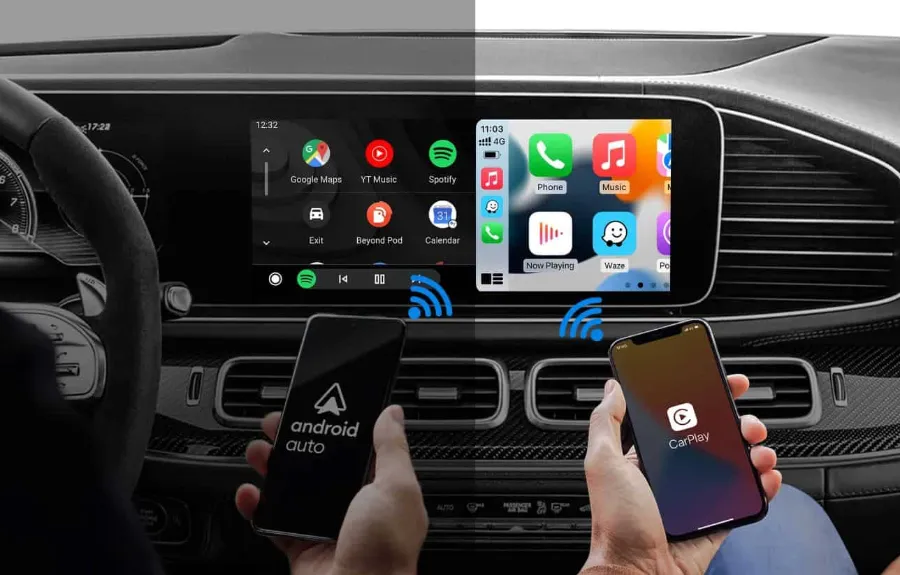
Wireless Android Auto changes the game. Instead of plugging in, it uses Wi-Fi Direct and Bluetooth to establish a connection. That means as soon as you start your car, your phone links up automatically. No cords. No waiting. Just instant connectivity.
Think about the difference. Traditional wired Android Auto works fine, but it’s another step in your routine. Wireless eliminates that extra task. And let’s be honest, when you’re running late for work or juggling groceries, those small things matter.
How Wireless Android Auto Works
At its core, the technology is straightforward. Here’s the process, step by step:
- Bluetooth pairing kicks in first. This establishes a handshake between your phone and your car.
- Wi-Fi Direct takes over. It’s not using your home Wi-Fi, it creates a private connection directly between your car’s head unit and your phone.
- Your apps and functions load. The infotainment screen mirrors supported apps, and you can use voice commands, steering wheel buttons, or touchscreen controls.
The important point? Wireless Android Auto needs a steady Wi-Fi connection. That’s why not all cars support it. Older infotainment systems often lack the necessary hardware.
Advantages of Wireless Android Auto
Let’s cut straight to the benefits.
- No cables, no clutter. Your dashboard stays clean, and you’re not constantly plugging/unplugging.
- Automatic connection. Once paired, it connects every time you start the car.
- Freedom of movement. Want to hand your phone to a passenger in the back? Go ahead. You’re not tethered.
- Improved durability. No more wearing out your charging port from repeated plugging.
There’s also a psychological element. When your car just works with your phone, it feels like a luxury experience, even if you’re driving an entry-level sedan.
Limitations You Should Know
But let’s not sugarcoat it. Wireless Android Auto isn’t perfect.
- Battery drain. Using Wi-Fi Direct constantly can drain your phone faster than wired mode. If you’re on a long road trip, you’ll probably want to keep a charger handy.
- Compatibility issues. Not all Android phones support it, and not all vehicles are equipped for it.
- Connection hiccups. Wireless means more potential interference compared to a reliable USB cable. Lag or dropouts can happen.
- Slower charging. Unlike wired mode, you’re not powering your phone while connected.
This doesn’t mean it’s a bad choice, it just means you need to weigh these trade-offs.
Which Phones Support Wireless Android Auto?
Not every Android phone makes the cut. Google has set specific requirements.
- Android version: You need Android 11 or higher.
- Phone model: Pixel phones (starting with Pixel 5 and newer) and many Samsung Galaxy models support it. Higher-end devices usually fare better.
- Hardware: Wi-Fi 5GHz capability is essential, which rules out some budget models.
If you’re unsure, the easiest way is to check your phone’s settings or Google’s compatibility list. If your phone doesn’t support it natively, don’t worry, you’re not out of options (we’ll get to that).
Which Cars Come With Wireless Android Auto?
This is where it gets interesting. Car manufacturers have been rolling out support over the past few years, but it’s still hit or miss.
- BMW, Audi, Mercedes-Benz – Many luxury models come standard with wireless Android Auto.
- Volkswagen, Hyundai, Kia – Most newer models in the mid-range market now include it.
- Honda, Toyota, Ford – Select trims and recent models support wireless connections.
If you drive a vehicle from 2020 or newer, there’s a good chance it has the hardware. But you’ll want to double-check your infotainment specs.
What If Your Car Doesn’t Support It?
Here’s where a lot of drivers breathe a sigh of relief. You don’t need a brand-new car to enjoy Wireless Android Auto. Third-party adapters exist, and they’re surprisingly effective.
Popular Wireless Android Auto Adapters:
- AAWireless – One of the most popular dongles. Simple setup, reliable connection, frequent firmware updates.
- Motorola MA1 – Officially licensed, compact, and plug-and-play. Works seamlessly with most Android phones.
- CarlinKit – A solid budget-friendly option, though performance can vary.
How do they work? You plug the adapter into your car’s USB port (where you’d normally connect your phone). It then acts as a bridge, creating a wireless link between your phone and the car’s head unit.
In short, you can upgrade your setup without replacing your entire car.
How to Set Up Wireless Android Auto
The setup is usually straightforward, but let’s lay it out clearly:
- Check compatibility. Make sure your car or adapter supports it.
- Enable Wi-Fi and Bluetooth on your phone.
- Pair your phone with the car’s infotainment system via Bluetooth.
- Follow prompts on the screen. The system will automatically shift to Wi-Fi Direct.
- Done! From now on, it should auto-connect each time you start the engine.
If you run into problems, deleting old pairings and starting fresh often solves them.
Wireless vs Wired Android Auto: Which One Wins?
This is where things get practical. Should you ditch the cable entirely?
- Wireless is best for daily commutes, short drives, and convenience-focused users.
- Wired is better for road trips, heavy navigation, or if you rely on charging while driving.
Personally, I’d recommend keeping both options available. Use wireless for everyday ease, but don’t toss out that cable just yet.
Security and Privacy Concerns
Any time wireless connections come into play, security questions follow. Is Wireless Android Auto safe?
The short answer: Yes. Connections are encrypted, and because it uses a direct Wi-Fi link, it doesn’t pass through public networks. However, as with any connected system, make sure your phone’s software is updated. Outdated firmware is where vulnerabilities often sneak in.
Is It Worth Upgrading for Wireless Android Auto?
Here’s the million-dollar question. Should you invest in a new car, new head unit, or an adapter to get wireless access?
It depends on your driving habits.
- If you’re in and out of your car all day, wireless is a lifesaver.
- If you go on long drives and rely on navigation, wired might still be the smarter choice.
- If your car doesn’t support it, an adapter is a relatively inexpensive way to modernize your ride.
In other words, it’s not about whether Wireless Android Auto is good, it’s about whether it fits your lifestyle.
Practical Tips to Maximize Wireless Android Auto
Want the smoothest experience possible? Try these:
- Use a phone mount. Even though you’re wireless, you’ll want quick access if something glitches.
- Carry a backup cable. Always handy for long trips.
- Keep apps updated. Google updates Android Auto regularly, and many bugs are fixed silently in the background.
- Optimize battery settings. Disable battery saver when using wireless mode to avoid forced disconnections.
Small habits can make a big difference in how reliable your setup feels.
The Road Ahead for Wireless Android Auto
It’s clear where this is going. More manufacturers are making wireless the default. Cables will eventually feel like old-school CD players, functional, but outdated. We’re not quite there yet, but the shift is happening.
What’s exciting is the potential integration with upcoming technologies. Imagine Android Auto blending seamlessly with your smart home setup, EV charging apps, or advanced driver-assist systems. The car is becoming an extension of your digital life, and Wireless Android Auto is the bridge.
Final Thoughts
Wireless Android Auto isn’t just about ditching the cord, it’s about making driving smoother, faster, and more intuitive. For many drivers, it’s the missing piece that turns an ordinary commute into a connected experience.
Yes, there are trade-offs. Battery drain is real, and not every car supports it out of the box. But the sheer convenience is hard to ignore. Once you’ve tried it, plugging in feels like a step backward.
So, whether you’re shopping for a new car, looking at adapters, or just curious about what’s possible, Wireless Android Auto deserves a serious look. The future of in-car tech is wireless, and it’s already here.
FAQs
Wireless Android Auto lets you connect your Android phone to your car’s infotainment system without using a USB cable. It uses Wi-Fi Direct and Bluetooth for a seamless, automatic connection.
Most modern Android phones running Android 11 or higher support it. Google Pixel and Samsung Galaxy models are the most commonly compatible devices.
No. While many new cars from brands like BMW, Kia, and Volkswagen support it, not every model does. Always check your car’s infotainment specs before assuming it’s included.
Yes. You can use third-party adapters like AAWireless or Motorola MA1. These devices plug into your car’s USB port and create a wireless link.
Yes, it uses more power than wired connections since Wi-Fi Direct is always active. Carrying a charger or enabling wireless charging can help on long trips.
Yes, it’s secure because the connection is encrypted and private. As long as your phone is updated, the risk of vulnerabilities is minimal.
Wireless is best for convenience and short drives. Wired is better for long trips where you’ll need constant charging and maximum reliability.